
02 / Web Application Development
Web application development for products and internal platforms
Dashboards, portals, SaaS products and workflow applications: browser-based software with accounts, roles, data and real business rules.
01What we build
The applications we build
- 01
Dashboards and reporting
Live views of the numbers a team actually uses, drawn from one source of truth.
- 02
Customer and partner portals
Self-service access to orders, documents, requests and status.
- 03
SaaS applications
Multi-user products with accounts, plans, permissions and an admin side.
- 04
Admin systems
The back-office tools that keep a product or operation running.
- 05
Workflow applications
Requests, approvals and hand-offs that follow a defined process.
- 06
Internal business platforms
Systems for one organisation, shaped around how its teams work.
02Problems we solve
The situations that lead people to us
Problem 1
The workflow lives in email
Status is spread across threads, and nobody can say where something stands.
Problem 2
One spreadsheet, many editors
Versions collide, formulas break and there is no history of who changed what.
Problem 3
Customers phone for updates
Information that could be self-service ends up costing staff time.
Problem 4
Reports are rebuilt by hand
The same numbers are re-collected every week because nothing connects.
Anatomy
What is inside a typical web application
- L1
Interface
What people see and use, built to be fast and accessible.
- L2
API
The contract between the interface and everything behind it.
- L3
Business rules
The logic that makes the software yours: approvals, pricing, eligibility.
- L4
Data
Tables, relationships and migrations in PostgreSQL, MySQL or MongoDB.
- L5
Jobs and integrations
Emails, scheduled tasks and links to other systems.
- L6
Operations
Deployment, logging and monitoring so problems are seen early.
03Capabilities
What is included in the work
Authentication and roles
Sign-in, role-based access and permissions designed with the workflow.
Data modelling
Schemas and migrations that stay correct as the product changes.
APIs and integrations
REST APIs, plus connections to the tools you already run.
Dashboards and tables
Filtering, search and exports that hold up on real data volumes.
Background jobs
Scheduled work, notifications and long-running tasks handled off the request path.
Documents and files
Uploads, storage and access control for the files that matter.
Audit trails
A record of who did what and when, where the business needs it.
Automated testing and CI/CD
Checks that run on every change, and repeatable releases.
04Technology
The tools this work uses
- Frontend
- Next.jsReactTypeScriptTailwind CSS
- Backend
- Node.jsExpress.jsREST APIs
- Database
- PostgreSQLMySQLMongoDB
- Cloud and DevOps
- AWSDockerGitHub Actions
05Process
How a web application build runs
- 01
Understand
Users, roles and the workflow as it works today, written down and checked with the people who do it.
- 02
Plan
Data model, permissions and release slices, with the smallest useful first release defined.
- 03
Build
Small, reviewed changes, with something to click through early.
- 04
Test
Automated checks for the rules that matter, plus testing of permissions and edge cases.
- 05
Deploy
A pipeline-driven release with a way back if something behaves differently in production.
- 06
Improve
Changes planned from how the application is really used.
06Concept project
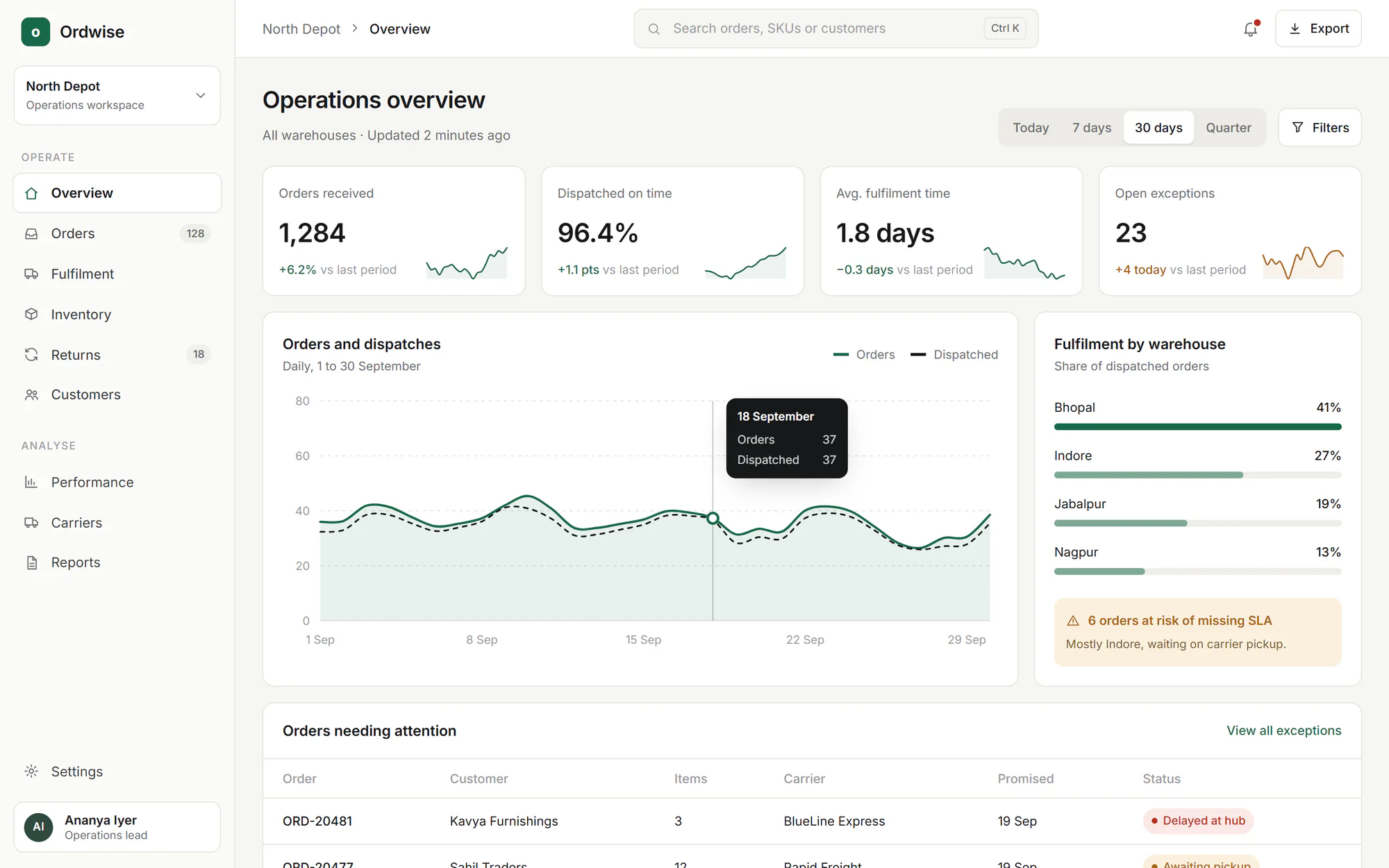
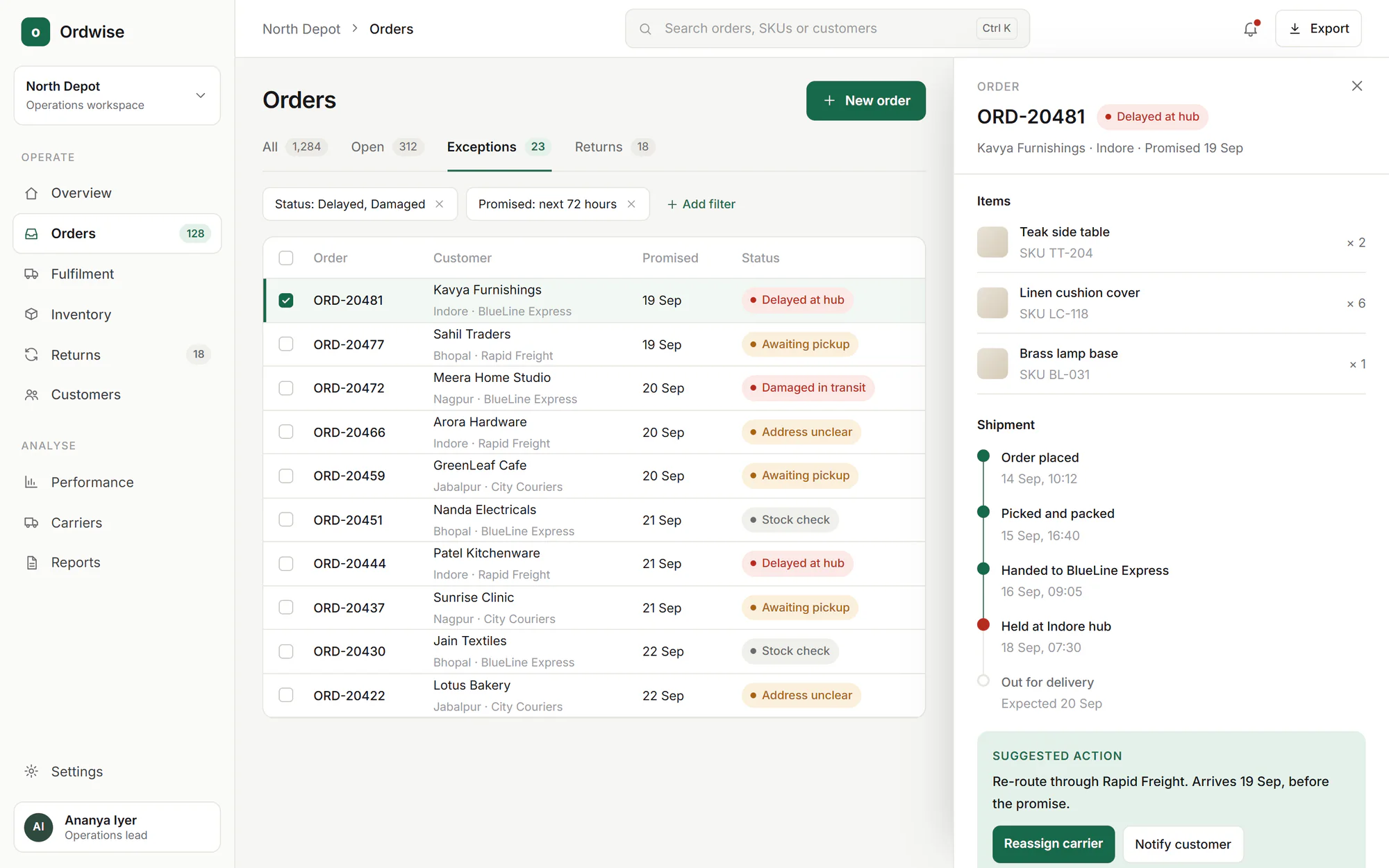
Ordwise: an order-operations web application
A web application for an operations team that dispatches orders from several warehouses: one overview, one list of exceptions, and a record drawer with the next best action.
01Operations overviewThe overview shows volume, service level and what needs attention now. 02Exceptions and order drawerExceptions open in a drawer with the shipment timeline and a suggested action.
07FAQ
Questions we are asked
Do you build MVPs?
Yes. We typically recommend starting from the smallest release that proves the core workflow, and planning what comes after it. Our guide on what an MVP should contain explains the approach.
How do you handle roles and permissions?
We recommend designing roles and permissions together with the workflow rather than adding them at the end. The usual approach is to give each role only the actions and data it needs, and to log sensitive actions.
Can the application connect to our existing tools?
Often, where those tools offer APIs or data exports. Each integration is assessed during planning, because some tools expose less than their marketing suggests.
Can you take over an application someone else built?
Possibly. The first step is usually a review of the code and infrastructure, followed by a recommendation on whether to extend it, refactor it or rebuild parts. That review is a consulting task.
What happens after launch?
Applications need fixes, updates and new features. Ongoing monitoring and further releases are possible, and the arrangement is agreed for each project.
Related
Have something worth building?
Tell us about the web apps project you have in mind. A short brief is enough to start.