
03 / Custom Software Development
Custom software development for business operations
ERP, CRM, LMS, HRMS, POS, billing and operations software, built around your process instead of forcing your process into a package.
01What we build
Where custom software earns its place
- 01
Replacing spreadsheet processes
The workbook everyone depends on becomes a system with roles, history and rules.
- 02
Connecting the tools you have
Integrations so data enters once and appears wherever it is needed.
- 03
Role-based internal systems
Each team sees and does only what its job requires.
- 04
Reporting layers
Consistent numbers from one source instead of rebuilt exports.
- 05
Legacy data migration
Moving records from old systems with checks, so nothing quietly goes missing.
- 06
Automation of routine steps
Approvals, reminders and hand-offs that no longer depend on someone remembering.
02Problems we solve
The situations that lead people to us
Problem 1
Manual processes
Work that still depends on spreadsheets, messages and repetitive steps.
Problem 2
Disconnected systems
Tools that do not share data make people the integration layer.
Problem 3
Packages that nearly fit
Off-the-shelf software covers most of the process but not the part that is specific to you.
Problem 4
Outdated software
A system that suited the business years ago now constrains it.
Module map
The kinds of systems we build
- 01
ERP
Finance, inventory, purchasing and operations in one connected system.
- 02
CRM
Leads, customers and follow-up, shaped around your sales process.
- 03
LMS
Courses, cohorts, assessments and progress tracking.
- 04
HRMS
Employee records, leave, onboarding and approvals.
- 05
POS
Point-of-sale with stock that updates as sales happen.
- 06
Billing
Quotes, invoices and payment tracking tied to your records.
- 07
Operations software
Scheduling, dispatch, work orders and field coordination.
- 08
Business automation
Workflows that move work between people and systems on their own.
03Capabilities
What is included in the work
Process mapping
The real workflow documented, including the exceptions nobody mentions.
Data modelling
A structure that reflects how your business describes its own work.
Roles and permissions
Access matched to responsibility, with an audit trail.
Integrations
REST APIs, imports and exports connecting to existing systems.
Reporting
Dashboards and exports for the people who need the numbers.
Migration
Cleaning and moving data from legacy systems and spreadsheets.
Documentation and training
Material so the people who use the system can use it well.
04Technology
The tools this work uses
- Frontend
- Next.jsReactTypeScript
- Backend
- Node.jsExpress.jsREST APIs
- Database
- PostgreSQLMySQLMongoDB
- Cloud and DevOps
- AWSDockerNginxPM2GitHub ActionsCI/CD
05Process
How a custom software build runs
- 01
Understand
How the work really happens, who touches it, and what done means.
- 02
Plan
A written scope, a data model and a sequence of releases.
- 03
Build
Release by release, starting with the part that removes the most pain.
- 04
Test
Rules, permissions and migrated data checked with the people who use them.
- 05
Deploy
A controlled rollout, with training and a rollback plan.
- 06
Improve
Adjustments from real use, and the next module when you are ready.
06Concept project
Ironleaf: an ERP with billing and inventory
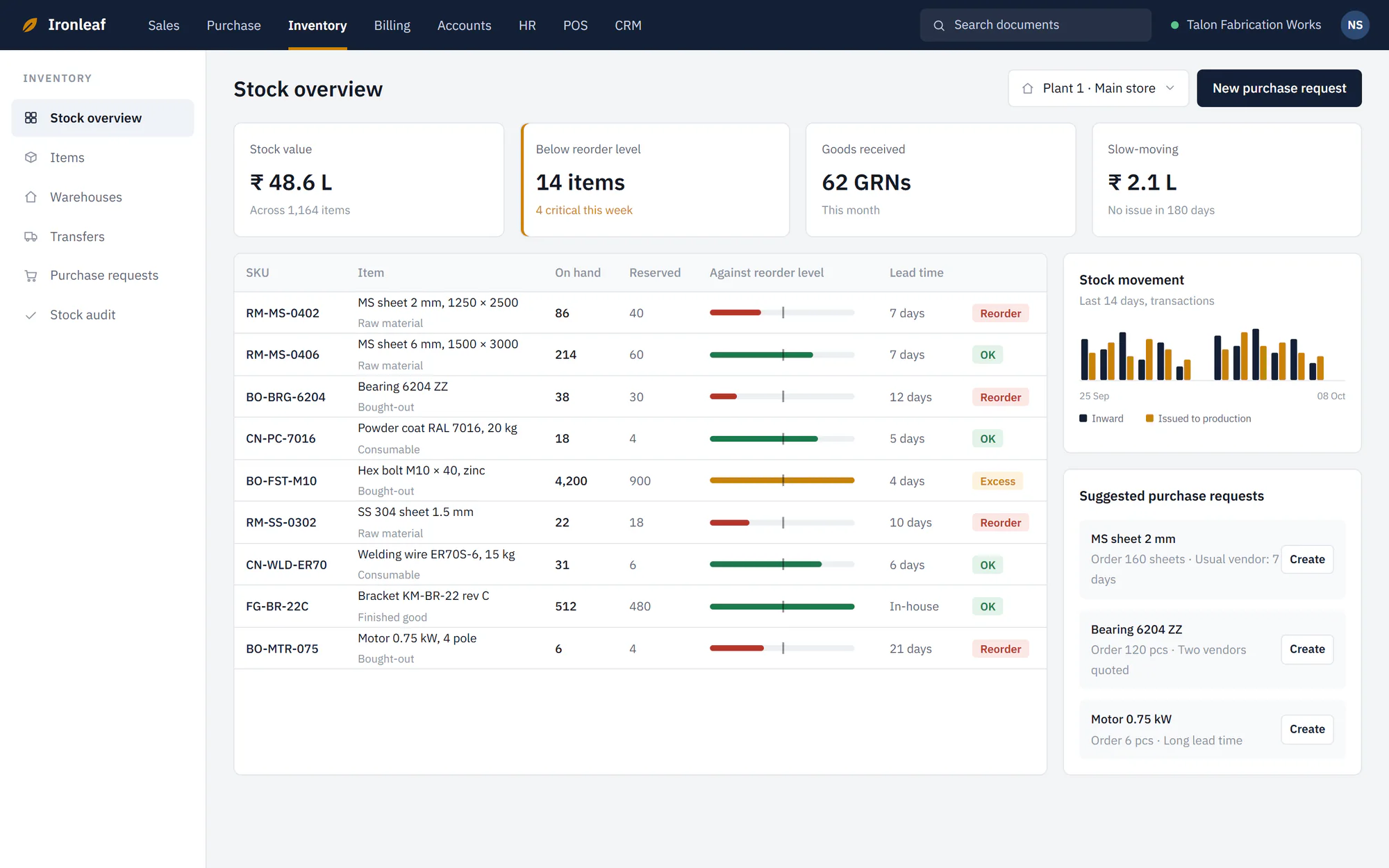
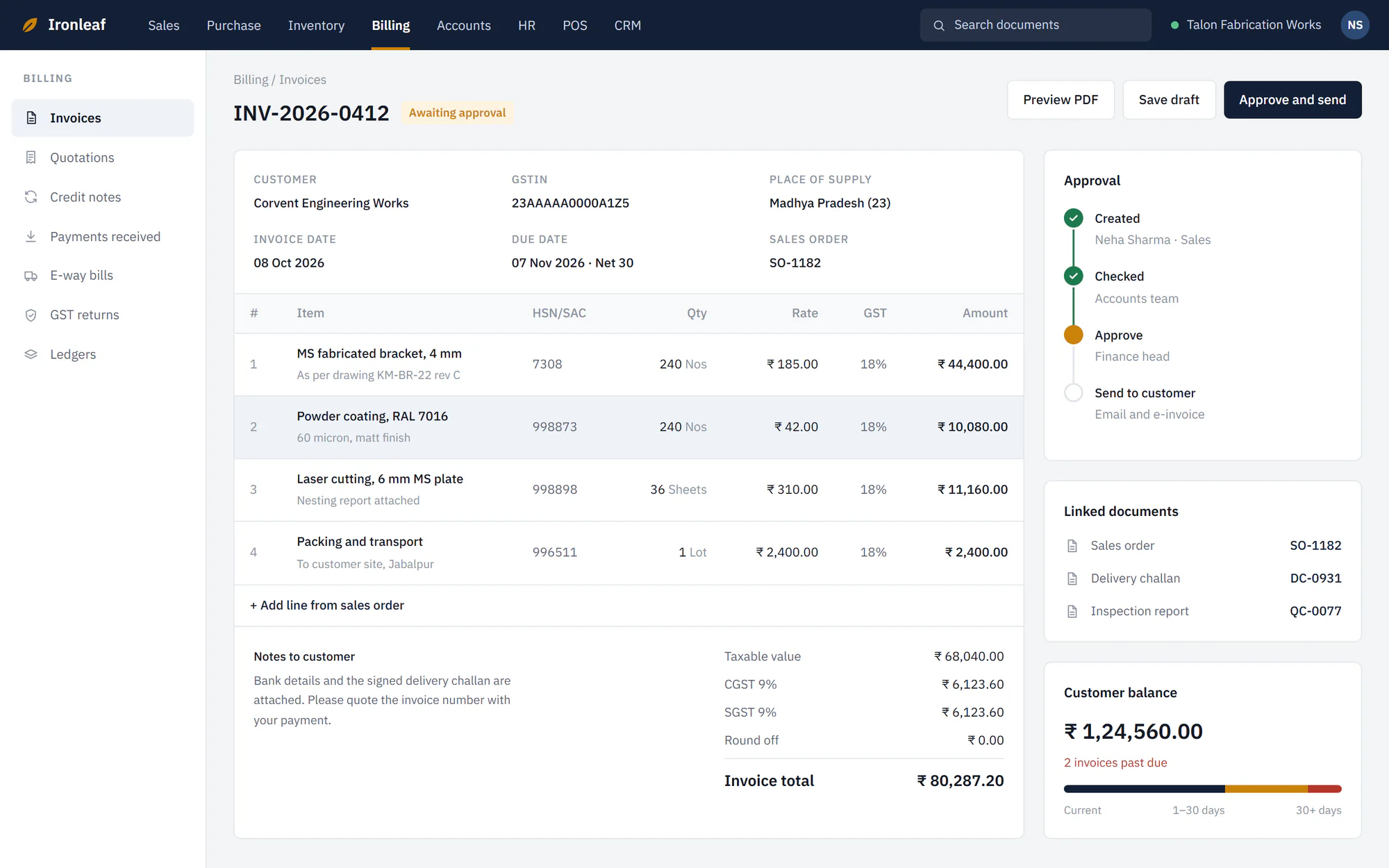
A custom ERP for a fabrication business: modules for sales, purchase, inventory, billing and HR around one data model, with GST invoices that go through an approval step.
01GST invoice with approvalAn invoice carries its tax breakdown, approval state and linked documents. 02Stock overviewInventory shows what to reorder and when, from the same records.
07FAQ
Questions we are asked
Should we build custom software or buy a package?
Buy when a package fits the process well. Build when your process is a competitive part of the business, or when no package fits and the workarounds cost more than the software. Our comparison guide walks through the decision.
Can you replace our Excel-based process?
Often, yes. A typical first step is documenting what the spreadsheet really does, including the formulas and habits around it, and then rebuilding it as a system with roles and history.
Can our existing data be migrated?
Often, depending on the quality of the data. A typical approach is to assess data quality first, rehearse the migration and reconcile the results before go-live.
How do you keep scope under control?
Our approach is a written scope, small releases and explicit handling of changes, so new requests can be discussed with their effect on time and cost before they are accepted.
How much does custom software cost?
It depends on scope, integrations and the number of roles and workflows. Estimates are normally prepared after a scoping conversation, and our cost guide explains what moves the number.
Have something worth building?
Tell us about the custom software project you have in mind. A short brief is enough to start.